Setup Your Puppy Tweets

What is Puppy Tweets™?

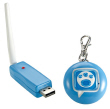
Ever wonder what your pet is doing while you're away? Whenever your dog moves or barks, the Puppy Tweets™ tag detects it and sends a signal to your home computer. Your computer receives the data then sends a Tweet from a bucket of preselected Tweets to Twitter. Puppy Tweets™ recognizes level of movement, sound, time of day, and day of the week. Follow all your dog pals on their very own Twitter page!

Is this really Tweeting what my dog is doing all day?

Puppy Tweets™ measures my level of activity and sends a Tweet based on whether it's high or low.  As for the rest of my day – that's my own little secret…

Do I need to set up a separate Twitter account for my dog?

You can run Puppy Tweets™ from your own Twitter account or a new account specific to your dog. Go ahead, give your furry friend their own account. That's what all the hip dogs are doing these days! Just pop over to www.twitter.com and set up your dog's own account. Take note of the user name and password then set up your Puppy Tweets™ via the software.

What software systems does Puppy Tweets™ work with?

Windows Operating System: Windows XP, Windows Vista, Windows 7. Minimum RAM requirement: 128 MB. Required Hard disk space: 20 MB. CPU: x86 compatible CPU MAC: Operating System: Mac X10.5. Minimum RAM requirement: 128 MB. Required Hard disk space: 20 MB

I've completed the set up but my tag isn't being recognized by my computer.

Remove the battery from my tag, press the reset button for 3-4  seconds, then reinstall the battery. The tag should be recognized now. Still having problems, give us a call at 1-800-524-8697

What does the date on the battery included with Puppy Tweets™ mean?

The date on the battery included with Puppy Tweets is the "manufactured on" date, not the expiration date.

These Tweets are great but I'm starting to see repeats. Can I get more?

Yes, download packs for Puppy Tweets™ will be available soon. I'm working on them as we speak.

Can I change how often I receive Tweets from my dog?

Sure. Just Right click (Control click for Mac) on the Puppy Tweets™ icon in tray, then click on "num of tweets", then select High, Medium or Low.  

I'm having trouble with my Puppy Tweets™.  Help!

Please call Mattel Customer Service at 1-800-524-8697.

Is Puppy Tweets™ safe for my dog?

Yes.

dog photo
find out how it works

Watch a video to find out how Puppy Tweets™ works.


Watch it now
recent press

Find out what people are saying about Puppy Tweets™.

Read more
pre-order now

Order Puppy Tweets™ and be the first pups in the Twitterverse.

Order now

.